

USB Type C to AUX Adapters
USB Type C to AUX Adapters
What exactly is a USB Type C to AUX adapter? Think of it as an essential translator for your audio. It’s a compact cable that allows your traditional headphones with a standard 3.5mm plug to communicate seamlessly with a new smartphone or laptop that only features a USB-C port. It's the simple bridge that keeps your favourite wired audio gear relevant and ready to use.
Why Your New Phone Needs a USB-C to Headphone Adapter
USB Type C to AUX Adapters
If you've recently unboxed a new smartphone only to find the familiar round headphone jack has vanished, you're not alone. In a push to create slimmer devices and encourage the shift to wireless audio, manufacturers are increasingly removing the traditional 3.5mm audio port.
This industry-wide trend can be frustrating, especially if you've invested in high-quality wired headphones or rely on an AUX cable for your car stereo. This is precisely where the USB Type C to AUX adapter becomes an indispensable tool.
The Rise of an Essential Accessory
As the headphone jack began to disappear, the demand for a simple, effective solution skyrocketed. This created a massive market for these small adapters, particularly in regions like Southeast Asia, where smartphone adoption is accelerating.
The numbers tell the story. The Asia-Pacific region now accounts for approximately 41% of the global USB-C to 3.5mm adapter market, which is valued at around USD 508 million. This explosive growth is driven by flagship phones from giants like Samsung and Xiaomi that have fully embraced the USB-C-only design.
Instead of being forced to buy new wireless earbuds, this small accessory offers a brilliantly cost-effective way to continue using the gear you already own and love. The benefits are clear:
- Preserve Your Sound: Continue enjoying the superior audio quality and unique sound profile of your favourite wired headphones.
- Save Money: Avoid the unnecessary expense of purchasing new Bluetooth headphones just because you upgraded your phone.
- Stay Connected: Effortlessly plug into a wide range of audio systems, from your car stereo to home speakers, without any hassle.
This adapter is more than just a cable; it’s a vital piece of technology that ensures your audio experience isn’t limited by modern design trends. While streamlining your phone's connections, it's also a great opportunity to simplify your charging setup. A quality 4-in-1 wireless charging station can help declutter your space and keep all your devices powered.
Understanding Digital vs. Analog Audio Signals
To understand why a USB Type C to AUX adapter is necessary, we need to explore the two "languages" your devices use for audio. The traditional 3.5mm headphone jack speaks analog. An analog signal is a continuous, smooth electrical wave that is a direct physical representation of the sound itself—simple, pure, and direct.
In contrast, your modern phone's USB-C port speaks digital. A digital signal is not a wave but a stream of data—the ones and zeros that form a precise description of the sound, much like a computer file.
The Recipe vs. The Cake
Let's use an analogy. Digital audio is like a detailed recipe for a cake. It contains all the exact instructions—ingredients, measurements, and baking time—but you can't eat the paper it's written on.
Analog audio is the finished cake itself. It's the rich, delicious, fully-formed treat you can actually enjoy. Your headphones can only "eat" the cake, not the recipe.
The primary job of a USB-C to headphone adapter is to act as the master baker. It takes the digital recipe from your phone and perfectly bakes it into an analog cake that your headphones can serve as beautiful, clear sound.
This translation is essential. Without it, your phone is sending out a set of instructions that your headphones simply cannot understand, resulting in silence.
Meet the DAC: The Tiny Chip That Works Magic
So, how does this conversion happen? The hero of this process is a tiny but powerful component called a Digital-to-Analog Converter (DAC). This microchip is the engine inside your adapter, responsible for all the heavy lifting.
The DAC takes the incoming stream of ones and zeros from your phone and skilfully reconstructs it into a smooth, continuous analog wave that your headphones can interpret as sound. The quality of this DAC chip has a significant impact on what you ultimately hear.
A high-quality DAC follows the digital "recipe" with incredible precision, delivering major benefits:
- Richer Sound: It reproduces a wider range of frequencies, making your music sound more detailed and vibrant.
- Lower Noise: A good DAC eliminates annoying background hiss or static, providing a clean, clear listening experience.
- Faithful Playback: It ensures the sound you hear is as true to the original recording as possible.
Essentially, every USB Type C to AUX dongle is a tiny, external sound card for your device. It’s a specialised piece of hardware dedicated to one task: turning digital instructions into beautiful, audible music. That’s why a simple wire won't work—the adapter needs this built-in brain to bridge the gap between two different audio worlds.
Active vs. Passive Adapters: What's the Difference?
Now that we understand the role of the Digital-to-Analog Converter (DAC), let's explore the two main types of USB Type C to AUX adapters: active and passive. Choosing the right one is crucial to ensure it works correctly with your device.
Think of an active adapter as a smart speaker with its own built-in amplifier. A passive one is more like a simple pair of unpowered speakers that rely on an external amplifier—in this case, your phone's internal DAC—to produce sound.
Getting this choice right is the most important step when buying an adapter. A mismatch is the leading cause of adapters that produce nothing but frustrating silence.
Active Adapters: The Universal Solution
An active USB C to AUX adapter is the intelligent choice. It contains its own dedicated DAC chip, making it a complete, self-contained audio system. It takes the digital audio signal from any USB-C port, performs the conversion itself, and then sends the ready-to-play analog signal to your headphones.
Because it handles the entire conversion process internally, an active adapter offers universal compatibility. It is designed to work with virtually any modern smartphone, tablet, or laptop with a USB-C port, regardless of how the manufacturer configured that port.
An active adapter is your safest bet. It’s a complete audio solution in a compact package, designed to work universally and guarantee sound from almost any USB-C device.
Passive Adapters: Simpler, but More Selective
A passive USB C to AUX adapter is a much simpler device. It contains no DAC chip. It is merely a set of wires that relies on your phone to send an analog audio signal directly through its USB-C port.
This only works if your phone supports a feature called "Audio Accessory Mode," where the phone's own internal DAC sends an analog signal through specific pins on the USB-C port. The problem? Fewer and fewer phones support this feature. Major brands like Apple and Google have dropped support for it entirely.
The transition to USB-C has been rapid across Southeast Asia. In countries like the Philippines and Thailand, where smartphone ownership has surpassed 80%, most new models have eliminated the headphone jack. This has created a massive demand for USB C to AUX adapters to connect existing headphones. You can learn more about this market shift in reports from Archive Market Research.
So, how do you choose? This quick comparison will help you decide.
Active vs. Passive USB-C to AUX Adapter Comparison
This table provides a side-by-side look to help you determine which adapter is the right fit for your equipment.
| Feature | Active Adapter (with DAC) | Passive Adapter (without DAC) |
|---|---|---|
| Built-in DAC | Yes, it has its own converter. | No, it relies on the phone's DAC. |
| Compatibility | Works with nearly all USB-C devices. | Only works with specific phones that support "Audio Accessory Mode". |
| How it Works | Converts digital audio to analog. | Simply passes an existing analog signal through. |
| Best For | Newer phones (Google Pixel, Samsung Galaxy S/Note, iPhone 15), tablets, and laptops. | Older or specific Android models (check your phone's specs first!). |
| Reliability | Very high. The go-to choice for guaranteed sound. | Hit-or-miss. Can be a gamble if you're not sure about your phone. |
Ultimately, unless you can confirm that your specific phone model supports Audio Accessory Mode, an active adapter is the most reliable choice to get you back to enjoying your music, podcasts, and calls without any complications.
How to Check Compatibility with Your Devices
Selecting the right USB Type C to AUX adapter all comes down to one thing: compatibility. You need to ensure your device, the adapter, and your headphones can all work together seamlessly. This quick checklist will guide you through the simple checks to perform before you buy.
The most critical factor is determining whether your phone or laptop requires an active or passive adapter. As a general rule, most modern devices from major brands like the Google Pixel, Samsung Galaxy S series, and the iPhone 15 family no longer have the internal DAC needed for passive adapters. This means they almost always require an active adapter with its own built-in DAC to handle the audio conversion.
If your phone lacks the built-in hardware to send analog audio through its USB-C port, you need an adapter that can do the job itself. This decision tree makes it clear.
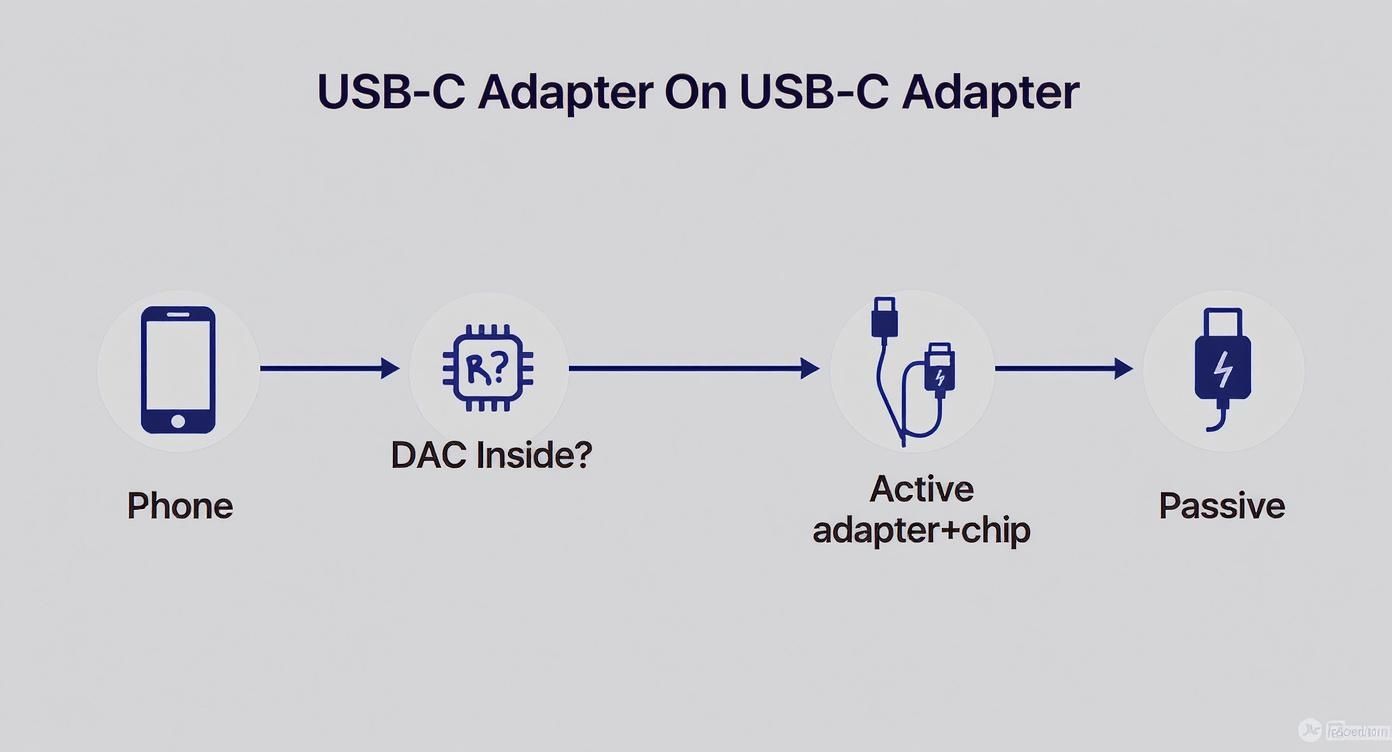
For the vast majority of new devices, this visual guide confirms it: an active adapter is your safest and most reliable choice.
Ensuring Your Headphones Will Work Perfectly
So, your phone is covered. But what about your headphones? Compatibility is especially important if they have a built-in microphone or remote controls. These features depend on the wiring standard of the 3.5mm plug, and a mismatch can cause them to fail.
There are two main standards:
- CTIA (Cellular Telecommunications Industry Association): This is the modern standard used by nearly all major manufacturers today, including Apple, Samsung, and Google.
- OMTP (Open Mobile Terminal Platform): This is an older standard you might find on some legacy devices.
The good news is that almost all modern headphones and adapters are built to the CTIA standard, ensuring they work together perfectly. If you are using a very old pair of headphones and the microphone isn't working with your new adapter, an OMTP-to-CTIA converter may be the simple fix you need.
The move to USB-C is accelerating. The global USB Type-C market was valued at USD 33.4 billion and is projected to more than double by 2035. This massive shift is driving the demand for essential accessories like the USB C to AUX adapter, especially in growing markets across Southeast Asia.
Finally, while optimising your audio setup, consider streamlining your other accessories. If you're simplifying connections with an adapter, why not tidy up your charging routine too? Explore a solution like a 3-in-1 foldable charging station to keep all your essential gadgets powered up and organised.
Troubleshooting Common Adapter Problems
You’ve purchased your new adapter, but something isn't right. Maybe there's no sound, or you hear frustrating static. Don't worry—most issues with a USB Type C to AUX adapter are easy to fix. Let's walk through the most common problems and get you back to your music.
Before diving into your phone's settings, always start with the physical connections. The vast majority of audio issues stem from a simple connection problem.
Checking the Physical Connection
First, ensure everything is plugged in securely. A loose cable is the most common reason for audio cutting out or your phone failing to recognise the adapter.
- Unplug and Replug: Disconnect the adapter from your phone and the headphones from the adapter. Wait a few seconds, then plug everything back in, making sure you feel a solid click on both ends.
- Check for Debris: Pocket lint is the enemy of a clean connection. Inspect your phone’s USB-C port and the adapter’s connectors. If you see any dust or debris, a quick burst of compressed air or a gentle sweep with a soft, dry brush can clear it out.
If the connection is secure but the problem persists, it may be a software issue.
No Sound or Static Issues
If you hear silence or a crackling noise, check where your phone is sending the audio. It’s common for a device to mistakenly route sound to its own speakers or a nearby Bluetooth device.
A classic scenario: your phone’s main volume is up, but the specific volume for wired headphones is set to zero. Always double-check the headphone volume level right after you plug in the adapter.
Try this troubleshooting sequence:
- Confirm the Audio Output: With everything connected, press your phone’s volume buttons. An icon—typically a headphone symbol—should appear on the screen, confirming that audio is correctly routing through the USB Type C to AUX adapter.
- Test With Different Apps: Try playing audio from another app. Switch from a music streaming service to a video saved on your phone. This helps determine if the issue is with a specific app or the device itself.
- Restart Your Device: A simple reboot often resolves minor software glitches that prevent your phone from recognising the adapter.
- Check for Updates: Ensure your phone’s operating system is up to date. Manufacturers frequently release updates that include fixes for accessory compatibility, which could resolve issues with your USB Type C to AUX dongle.
What to Look for When Buying a Quality Adapter
When faced with a wide selection of adapters, it’s tempting to grab the cheapest one. However, not all USB Type C to AUX adapters are created equal. A thoughtful purchase can make a significant difference in both sound quality and durability.
The core of any good adapter is its built-in DAC. This chip's quality directly impacts how your music sounds. Look for specifications like 24-bit/96kHz or higher, which indicates the adapter can handle high-resolution audio. This preserves more of the original detail and richness in your tracks, allowing you to discover new nuances in songs you've heard countless times.
Build Quality and Materials
Beyond the internal technology, you need an adapter that can withstand daily use. The physical construction is just as important as the electronics.
Key features of a durable adapter include:
- Braided Cables: Nylon-braided cables are far more resilient than standard plastic and resist fraying over time.
- Reinforced Connectors: The points where the cable meets the plugs are the most vulnerable. Look for sturdy, reinforced housing around both the USB-C and 3.5mm ends.
- Metal Housings: Connector casings made from aluminum not only feel more premium but also provide better protection for the internal circuitry.
Investing a little more in a well-built adapter means you won't have to buy a replacement in a few months. It’s a classic case of buying it nice or buying it twice.
Finally, consider the brand. While you don't need the most expensive USB type c to aux adapter, choosing one from a reputable company ensures better quality control and customer support. Certified products are more likely to work as advertised and less prone to the compatibility issues that plague cheap, no-name alternatives.
Answering Your Top USB-C Adapter Questions
Even after covering the essentials, you might still have some questions. This final section tackles the most common queries about USB Type C to AUX adapters, providing clear and concise answers.
Will an Adapter Reduce My Audio Quality?
The short answer is no—in fact, a high-quality active adapter with a capable DAC can often improve your audio experience compared to a phone's old built-in headphone jack, delivering a cleaner and more detailed sound.
The key is quality. A poorly made, low-cost adapter may introduce static or use a subpar DAC that results in flat, lifeless music. As long as you choose a reputable adapter, your audio quality will be preserved or even enhanced.
Can I Charge My Phone and Listen to Music?
With a standard, single-port USB Type C to AUX dongle, you cannot. It occupies your device's only USB-C port, leaving no room for a charger.
However, the solution is simple: a splitter adapter. These versatile gadgets feature two ports—one for your 3.5mm headphones and another for your USB-C charging cable. They are perfect for long car journeys, flights, or extended listening sessions.
Remember that using an audio adapter does not guarantee lossless playback. The final quality depends on the entire signal chain, including the source file's quality and the DAC's capabilities.
Does My Adapter Work for Phone Calls? USB Type C to AUX Adapters
Yes, most modern adapters fully support headphones with a built-in microphone. They allow you to make and receive calls seamlessly by passing the microphone signal directly from your headphones to your phone.
Speaking of convenience, it's fascinating to see how audio technology is integrating with other devices. For example, the new T92 Smart Watch integrates TWS Bluetooth headsets, showcasing the seamless convergence of smart devices and audio.
At N&L E-com Store, we believe that style and technology should be accessible to everyone. Explore our collection of smart, practical accessories that keep you connected without breaking the bank. Shop our full range today
Article created using Outrank


